
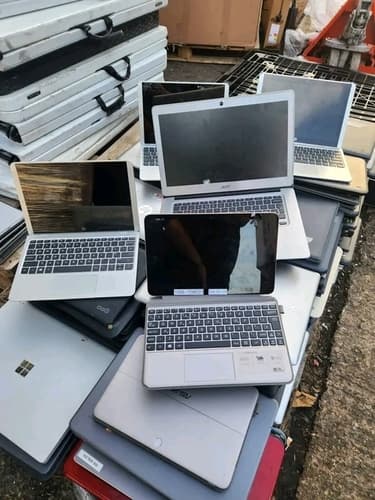
Do you have an old laptop that you no longer use? Perhaps it has become slow, the battery no longer holds a charge, the screen is damaged or the device has stopped working completely. If you are planning to sell an old laptop in Ludhiana, checking its potential scrap value is a useful first step. Scraplift lists laptops in its Computers category and publishes indicative prices for working and non-working devices. Before arranging collection, compare the relevant price range, prepare the laptop safely and protect your personal information. This guide explains the important steps to take before selling your old laptop.
What Is the Old Laptop Scrap Price in Ludhiana?
Scraplift's published rate card lists the following indicative prices for laptops.
| Laptop Condition | Indicative Price | Pricing Unit |
|---|---|---|
| Working laptop | ₹3,500–₹10,000 | Per piece |
| Non-working laptop | ₹500–₹3,500 | Per piece |
Price note: These figures are based on Scraplift's published rate card, last shown as updated on 03/11/2026. Verify the live rate card before publication. The prices are indicative, not guaranteed payouts. The final offer depends on the laptop's condition and physical inspection.
The price of an old laptop depends on more than its original purchase cost. A device that works properly may have reuse potential, while a laptop with a damaged motherboard, broken screen or other major fault may be assessed differently. The brand, model, physical condition, completeness and potential for reuse or material recovery can influence the valuation. Check the current price range before booking, and review the final offer before agreeing to sell your device.
What Factors Affect an Old Laptop's Scrap Value?
Working or Non-Working Condition
A working laptop may have greater reuse potential than a device with major hardware faults. However, a laptop that powers on may still have problems with its display, keyboard, battery, storage or charging system. When requesting a pickup, describe the actual condition of your laptop. Mention whether it starts, whether the display works and whether any important components are damaged or missing. Do not attempt repairs or open the laptop just to improve its quoted value unless you are qualified to do so.
Brand, Model and Specifications
The brand and model help identify a laptop's specifications, age and original configuration. Processor generation, memory, storage and other features may influence its potential for reuse. However, a premium brand does not automatically guarantee a higher scrap offer. A laptop's actual condition and the assessment of its components remain important. Share the model information if available, but avoid publishing sensitive information such as passwords, account details or private files when communicating with a collection team.
Battery, Screen and Motherboard Condition
The battery, display, motherboard, charging port and other internal components can influence the condition of a laptop. A damaged screen, faulty motherboard, swollen battery or missing internal components may affect the final assessment. Mention any known hardware problems when arranging collection. Do not attempt to remove or puncture a swollen battery. Keep a device with a damaged or swollen battery away from heat and follow appropriate professional handling guidance.
Charger and Other Accessories
Some laptops are supplied with a charger, power adapter or other accessories. The presence or absence of these items may be relevant to the assessment. Keep accessories you want to retain separate from the laptop. Tell the collection team what is included and confirm whether the accessories are accepted. Do not assume that including a charger or laptop bag automatically increases the final offer.
Can You Sell a Broken or Non-Working Laptop?
A broken or non-working laptop may still be eligible for collection. Scraplift's published rate card includes a separate indicative price range for non-working laptops. Before booking, describe the problem accurately. It could be a faulty motherboard, damaged display, broken hinge, charging problem or a device that does not power on. Acceptance and final valuation depend on the actual device and inspection. If the laptop has a swollen battery or other physical damage that could create a safety risk, disclose it before arranging collection.
How to Protect Your Data Before Selling an Old Laptop
- Back up important documents, photos and other files you want to keep.
- Check that your backup is accessible before deleting anything.
- Sign out of email, cloud storage and other personal accounts.
- Remove the laptop from trusted-device lists where appropriate.
- Deauthorise applications or services if their policies require it.
- Securely erase the internal storage using an appropriate method supported by the device.
- Follow the manufacturer's guidance for securely resetting or erasing the device.
- If the laptop does not work, ask about safe data removal or storage-device handling before handover.
- Remove memory cards, USB drives and other personal accessories you want to keep.
- Confirm the collection arrangements before handing over the laptop.
Important data-safety reminder: Deleting files or emptying the recycle bin does not necessarily erase all data securely. Back up your important files and use an appropriate secure-erasure method before handing over a working laptop. If the device is broken and contains sensitive information, discuss secure storage-device handling before collection.
Should You Repair, Resell or Scrap an Old Laptop?
Before selling your laptop for scrap, consider whether repair or resale could be a better option.
- Consider repair if the fault is minor and the estimated repair cost is reasonable.
- Consider resale if the laptop works properly and still has useful specifications and reasonable market value.
- Consider scrap collection if the device is severely damaged, obsolete or uneconomical to repair.
Compare the repair estimate, possible resale value and confirmed scrap offer. Your best option depends on the laptop's condition, age, specifications and intended use. Regardless of the option you choose, protect your personal data before transferring ownership.
Why Should Old Laptops Be Disposed of Responsibly?
Laptops contain electronic components, circuit boards, batteries, plastics and metals. Improper disposal can create environmental and safety concerns, particularly when batteries or electronic components are damaged. Use an appropriate collection or recycling route for devices that are no longer useful. Do not burn, dismantle or dispose of electronic equipment in unsuitable locations. If your laptop contains a battery that is swollen, leaking or physically damaged, do not attempt to dismantle it. Seek appropriate handling guidance before arranging collection.
How to Book Old Laptop Scrap Pickup in Ludhiana
- Visit Scraplift's website and open the items catalogue.
- Select the Laptop category.
- Check the current indicative price range.
- Share the laptop's brand, model and working condition.
- Provide photographs if the booking process supports them.
- Confirm that your pickup address is within the supported service area.
- Choose an available pickup slot.
- Back up and securely erase your personal data before handover.
- Allow the collection team to inspect the laptop.
- Review the final offer and agree to the sale only if you accept the terms.
Scraplift offers doorstep collection for supported items in eligible Ludhiana service areas. Its website provides an items catalogue, indicative rates and a pickup booking process. Before arranging collection, confirm the latest laptop rate, the pickup availability for your address and any special handling requirements for a damaged device. The final offer is confirmed after inspection, so the published price range should be treated as indicative rather than guaranteed.
Why Choose Scraplift to Sell an Old Laptop?
- Check indicative laptop prices before requesting collection.
- Share accurate details about the laptop's condition.
- Confirm item acceptance and service availability for your address.
- Arrange doorstep pickup for supported items in eligible areas.
- Review the inspection-based offer before agreeing to sell.
- Protect personal information before handing over the device.
- Confirm the collection slot and payment arrangements with the team.
Contact Scraplift for Laptop Scrap Pickup in Ludhiana
Have an old, damaged or non-working laptop you no longer need? Contact Scraplift to check the current indicative price, confirm pickup availability for your address and arrange collection for your device. Primary contact: +91-6280638378 Alternate contact: +91-9803454562 You can also visit Scraplift's website to check accepted items, review current indicative rates and submit a pickup request.
Before handing over your laptop, confirm the final offer and collection arrangements. Back up your important files and securely erase personal data wherever possible. If the laptop is damaged and cannot be accessed, discuss safe data and storage-device handling before collection.